Setup
Type of Work Classifications are Inventory Departments included in a Classification, such as Dispatch Type of Work. To set up this Classification, navigate to the Product tab at Hub / Setup / Company Preferences and select Department Classifications.
If a Dispatch Type of Work Classification does not exist, select Add, then enter the Name of the Department Classification. Double-click the Dept ID or Department Name column heading to select the necessary service fee Departments.
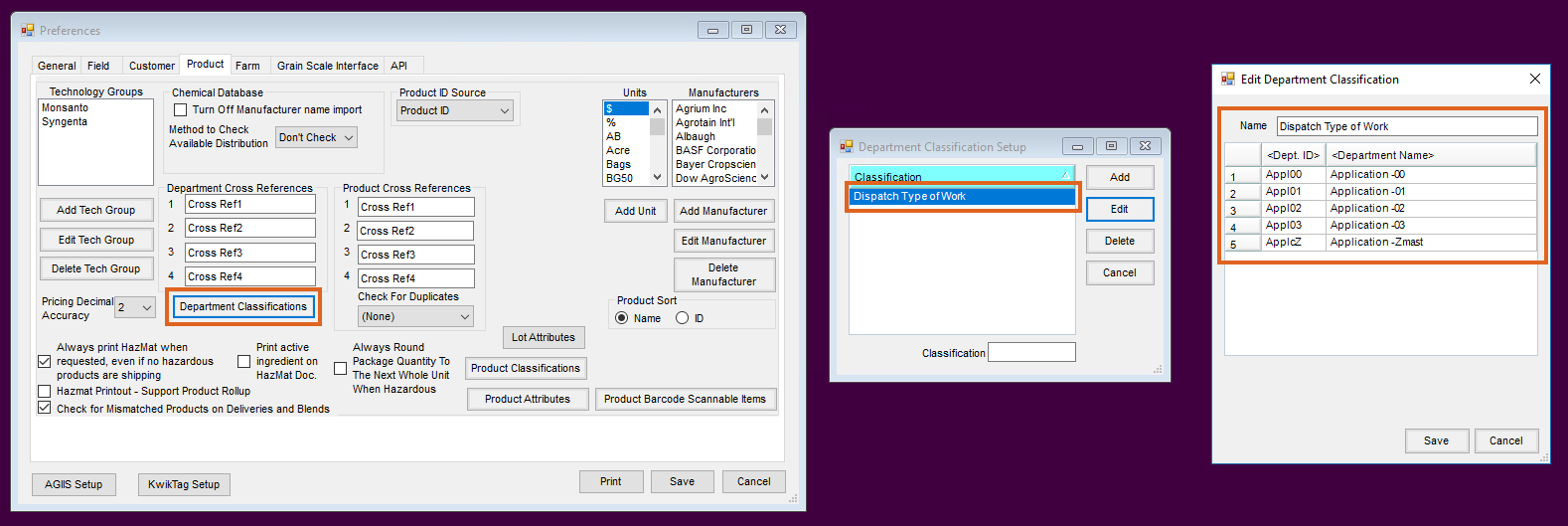
After the setup is complete, select Save.
Agvance Windows
Note: For Agvance SKY Dispatch, see here.
Open the Dispatch module. In the Agronomy Work Orders window, select the Setup button. On the General tab of the Multi API Work Order Setup window, select Dispatch Type of Work from the Type of Work Classification drop-down.

The Agronomy Work Orders grid is then filtered to display only the Products residing in the Inventory Departments included in the Dispatch Type of Work Classification currently included with the displayed tickets in the grid.
