Winfield is utilizing OAuth2 to provide a greater security level. Customers will need to reach out to Winfield to access credentials.
SSI Support will NOT be included in retrieving/accessing credentials.
Existing customers can be upgraded to OAuth2 any time by contacting edioperations@landolakes.com. The Land O'Lakes team will provide URLs and credentials to be used.
Customer Setup
- In B2B, navigate to Setup / API Profile, and select Add.
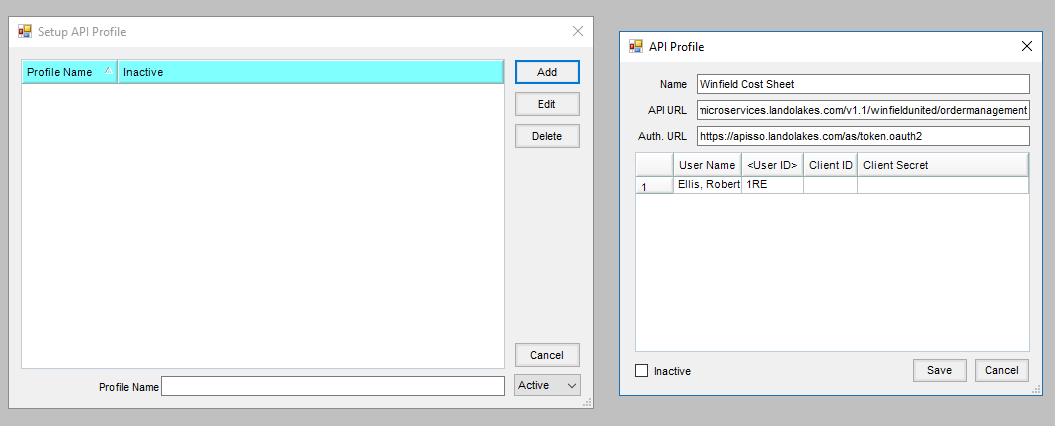
- Choose Add and enter the following:
- Name – Specify the Vendor/process (ex. Winfield Seed Order).
- API URL – https://microservices.landolakes.com/v1.1/winfieldunited/ordermanagement/
- Auth. URL – https://apisso.landolakes.com/as/token.oauth2
- For each Agvance User, add credentials for the Client ID and Client Secret (provided by Winfield), then choose Save.
Process Setup
For each process with a Winfield Vendor, complete the following setup. Possible processes where this setup are found under the B2B Setup menu:
- Seed Orders
- Electronic Delivery Notification (EDN)
- Price Sheet
- Purchase Order
Navigate to each setup grid, then choose the API Profile from the drop-down. Select Save.

