This interface is designed to export data in a format compatible with ExamHand auditing software that is used by several states’ warehouse examiners. As of early 2013, the following states’ auditors are using this software: CO, IL, IN, OH, MI, KS, KY, MN, MO, ND, SD, TX, ID and WY. The resulting file can be provided to examiners to streamline their examination tasks and shorten the examination process. The export function can be found at Grain / Transfers / Export / EDI-Examhand.
Setup
Follow the one-time setup procedures below to establish the necessary cross-referencing.
Establish a Commodity Cross Reference at Grain / Setup / Preferences. Identify one of the Commodity Cross References as ExamHand, or EDI-ExHnd, or something similar. Select Save.

Go to Grain / Setup / Commodities and edit each commodity to establish a Commodity ID Cross Reference with ExamHand. Identify the Code that corresponds to each commodity using the ExamHand Commodity Code Chart below. For example, the code for STS Soybeans is SSTS. Save each commodity after entering the code.

ExamHand Commodity Code Chart
| Commodity Description | Code | Commodity Description
|
Code
|
| Amaranth | AMR | Millet (Yellow)
|
MYE
|
| Barley (all types) | BARLY | Mustard Seed
|
MUS
|
| Barley (Blue Malting) | BLMB | Mustard Seed (Brown)
|
MBR
|
| Barley (Blue) | BLY | Oats
|
OATS
|
| Barley (Malting) | MB | Peas - Chick Garbanzo
|
PCG
|
| Barley (Six Row) | SRB | Peas - Dry Whole
|
PDW
|
| Bean (Caster) | CSTB | Peas - Green
|
PGN
|
| Buckwheat | BWHT | Peas - Lentil Chilean
|
PLC
|
| Canola | CNOLA | Peas - Lentil Persian
|
PLP
|
| Corn (Blue Food Grade) | CBFG | Peas - Split
|
PSP
|
| Corn (Food Grade - all types) | CFGC | Peas - Yellow
|
PYL
|
| Corn (Mixed) | MC | Proso (Golden German)
|
PGG
|
| Corn (Popcorn) | POPCN | Proso (Hungarian)
|
PHN
|
| Corn (Screenings - all types) | CSCRN | Proso (Org. White)
|
POW
|
| Corn (Waxy Yellow) | WAXYC | Proso (Red)
|
PRD
|
| Corn (White Food Grade) | CWFG | Proso (White)
|
PWT
|
| Corn (White Waxy) | CWWX | Rapeseed
|
RPE
|
| Corn (White) | WCORN | Rice (Long Grain)
|
RLG
|
| Corn (Yellow Food Grade) | CYFG | Rice (Med. Grain)
|
RMG
|
| Corn (Yellow High Lysine) | CYHL | Rye
|
RYE
|
| Corn (Yellow High Oil) | CYHO | Safflower Seed
|
SAFF
|
| Corn (Yellow) | CORN | Sorghum/Milo (Mixed)
|
XS
|
| Edible Bean (Abzuka) | BAB | Sorghum/Milo (Yellow)
|
SORGH
|
| Edible Bean (Adzuki) | BAD | Soybean (Edible - all types)
|
SED
|
| Edible Bean (Anasazi) | BAN | Soybean (Mixed)
|
XSB
|
| Edible Bean (Black Turtle) | BTURT | Soybean (STS)
|
SSTS
|
| Edible Bean (Brown) | SWBRN | Soybean (White HighLum)
|
SHL
|
| Edible Bean (BTS) | BBT | Soybean (Yellow Chemical Free)
|
SCF
|
| Edible Bean (Cranberry) | CRANB | Soybean (Yellow Organically Grown)
|
SOG
|
| Edible Bean (Dark Red Kidney) | DRKID | Soybean (Yellow)
|
SOYBN
|
| Edible Bean (Garbonzos) | BGA | Soybeans (Black)
|
SBB
|
| Edible Bean (Great Northern) | BGN | Spelt
|
SPLTZ
|
| Edible Bean (Large Lima) | BLL | Sunflower (Bird Seed)
|
SBS
|
| Edible Bean (Large Red Kidney) | LRKID | Sunflower (Black Oil)
|
SFLRO
|
| Edible Bean (Light Red Kidney) | LRK | Sunflower (Confection)
|
SFLRC
|
| Edible Bean (Navy) | NAVYB | Triticale
|
TRIT
|
| Edible Bean (Pinto) | PINTB | Wheat (Amber Durum)
|
ADU
|
| Edible Bean (Red Turtle) | RTURT | Wheat (Dark Northern Spring)
|
DNS
|
| Edible Bean (Small Red) | BSR | Wheat (Hard Amber Durum)
|
HADU
|
| Edible Bean (Small White) | BSW | Wheat (Hard Red Spring)
|
HRS
|
| Edible Bean (Vinton) | BVN | Wheat (Hard Red Winter)
|
HRW
|
| Edible Bean (White Kidney) | BWK | Wheat (Hard White)
|
HDWH
|
| Edible Bean (White Turtle) | WTURT | Wheat (Mixed)
|
XWHT
|
| Edible Bean (Yellow Eye) | BYE | Wheat (Northern Spring)
|
NS
|
| Edible Beans (Pink) | BPK | Wheat (Other White)
|
OWH
|
| Flaxseed (all types) | FLAXS | Wheat (Red Spring)
|
RS
|
| Flint | FLIN | Wheat (Soft Red Mixed)
|
SRWHT
|
| Grain (Mixed) | MIXGR | Wheat (Soft Red Spring)
|
WSRS
|
| Grain (Non-Standard) | NSTDG | Wheat (Soft Red Winter)
|
WSRW
|
| Millet (all types) | MILLT | Wheat (Soft White)
|
WSW
|
| Millet (White) | MWH | Wheat (White)
|
WWHT
|
Creating an Export
The following procedures can be followed when the state or federal examiner arrives for the examination/audit.
Upon arrival, the state or federal warehouse examiner/auditor will establish an examination cutoff date and time.
- Bring all records up to date in Agvance by entering and posting all transactions that have occurred up to the examination cutoff date and time. With Grain Bank, make sure to reconcile all Grain Bank Shipments so they will not come into the ExamHand program as a Grain Bank overdraft.
- Make a Database Image just prior to exporting information so the examination cutoff data can be referenced in the future if necessary. Check the Zip Image Files box to minimize the size of the file.
- Information for the examiner/auditor can now be exported. Go to Grain / Transfers / Export / EDI-ExamHand.
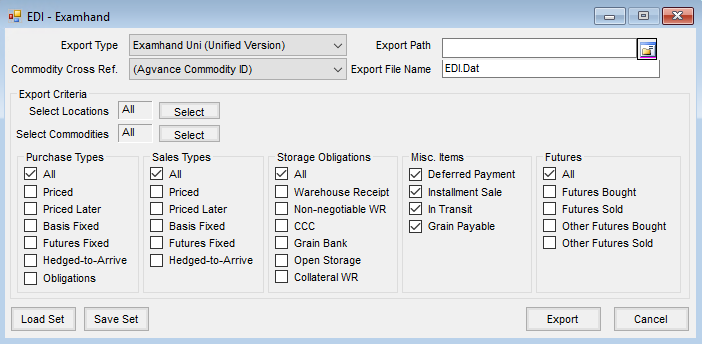
- Commodity Cross Ref. – Select the cross reference previously established at the beginning of this article.
- Export Path – Enter the path or use the Browse button to determine where the exported file will be saved.
Note: For large amounts of data and for convenience for the auditor, it may be helpful to export to a USB flash drive. - Export File Name – This defaults and must be EDI.Dat.
- Select Export Options – Select the Locations, Commodities, and all the Contract Types and Storage Obligations to export to the examiner/auditor.
- Save Set – These selections can be saved for future exports by selecting the Save Set button.
- Export – To create the export file, choose the Export button.
Note: For best results, examiners should select the load option in ExamHand called Direct Load: fully compliant edi file.
